
Adobe Photoshop 2026 for macOS – Complete Overview, Features, Uses & System Requirements
Adobe Photoshop 2026 for Mac OS represents the next evolution of the world’s most trusted image editing and graphic design software. Designed specifically to take advantage of Apple’s powerful hardware and the latest macOS technologies, this version delivers faster performance, smarter AI tools, and a smoother creative workflow for professionals and beginners alike.
Whether you are a graphic designer, photographer, digital artist, content creator, or web developer, Adobe Photoshop 2026 for Mac OS offers a complete toolkit to turn creative ideas into reality. With improved artificial intelligence, enhanced layer management, and better color accuracy, this release focuses on productivity, precision, and creativity—without compromising stability on macOS systems.
Overview of Adobe Photoshop 2026 for Mac OS
Adobe Photoshop 2026 is a professional image editing application developed by Adobe Inc.. It continues Photoshop’s legacy as the industry standard for photo editing, digital art, UI/UX design, social media creatives, and advanced image manipulation.
This Mac OS version is optimized for Apple Silicon (M1, M2, M3, and later chips), ensuring faster rendering, reduced power consumption, and seamless multitasking. From basic image corrections to complex compositing and AI-powered generative edits, Photoshop 2026 provides everything needed for modern creative workflows.
Adobe has also focused on cloud integration, allowing users to sync projects across devices, collaborate efficiently, and access assets anytime through Adobe Creative Cloud.
Key Features of Adobe Photoshop 2026 (macOS)
1. Advanced AI-Powered Tools
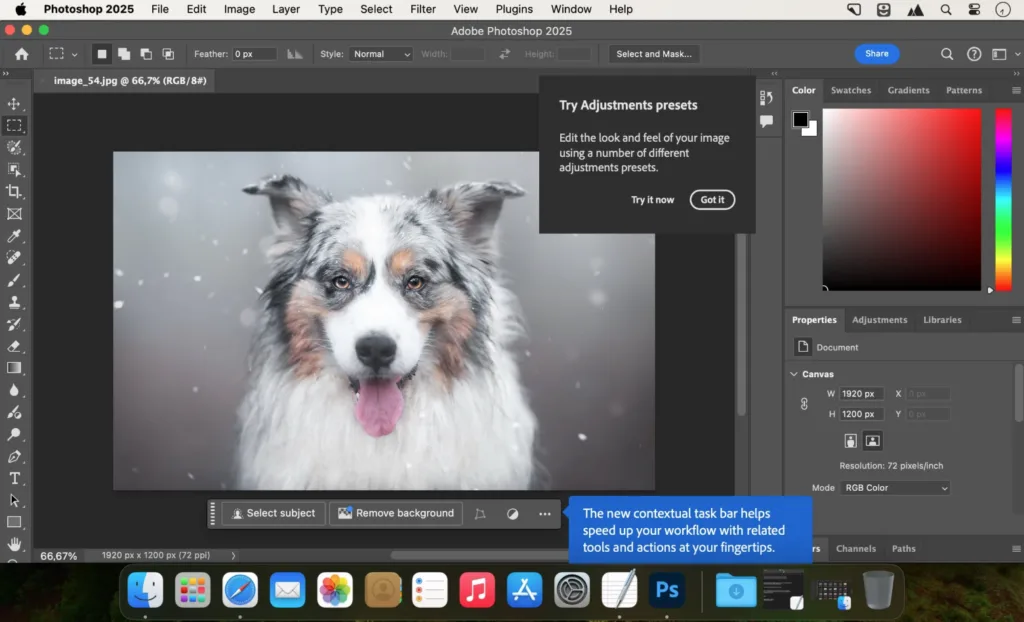
Photoshop 2026 introduces smarter AI features powered by Adobe Sensei. These tools help automate complex tasks like background removal, object selection, sky replacement, and intelligent retouching with just a few clicks.
2. Optimized Performance for Apple Silicon
The software is fully optimized for macOS and Apple Silicon processors. Users experience faster launch times, smoother brush strokes, real-time previews, and improved handling of large PSD files.
3. Enhanced Layer and Mask Controls
Layer management is more intuitive in this version. Improved masking tools allow precise selections, smoother edge detection, and better control over complex compositions.
4. Non-Destructive Editing Workflow
Photoshop 2026 continues to emphasize non-destructive editing. Adjustment layers, smart objects, and live filters allow users to experiment freely without permanently altering original images.
5. Improved Typography and Text Tools
Text handling is more flexible, with better font previews, enhanced spacing controls, and smoother integration for UI/UX and social media design projects.
6. Cloud Documents & Collaboration
Users can save projects as cloud documents, access them from any compatible device, and collaborate with team members efficiently. Version history ensures nothing is ever lost.
7. Professional Color Management
Accurate color profiles, HDR support, and enhanced color grading tools make Photoshop 2026 ideal for print, digital media, and professional photography workflows on macOS.
Also read:
Wondershare PDFelement Pro 12.1.2 (OCR) Free Downlaod
Scientific Toolworks Understand – Free Download
Uses of Adobe Photoshop 2026 for Mac OS
Adobe Photoshop 2026 is a versatile tool used across multiple industries:
- Photography Editing: Retouch portraits, enhance landscapes, correct colors, and restore old photos.
- Graphic Design: Create posters, banners, logos, thumbnails, and social media creatives.
- Web & UI Design: Design website layouts, mobile app interfaces, and digital assets.
- Digital Art & Illustration: Draw, paint, and illustrate using advanced brushes and pen tablet support.
- Marketing & Branding: Design ads, promotional creatives, and brand visuals.
- Content Creation: Perfect for YouTubers, bloggers, and influencers creating high-quality visuals.
Its flexibility makes it suitable for freelancers, agencies, students, and large enterprises.
Technical Details of Adobe Photoshop 2026 (Mac OS)
| Category | Details |
| Software Name | Adobe Photoshop 2026 |
| Platform | macOS |
| Architecture | 64-bit |
| Processor Support | Intel & Apple Silicon |
| File Formats | PSD, PSB, JPG, PNG, TIFF, GIF, SVG (import), PDF |
| Language Support | Multi-language |
| Cloud Integration | Yes |
System Requirements for Adobe Photoshop 2026 (macOS)
Minimum Requirements:
- Operating System: macOS 12 (Monterey) or later
- Processor: Intel multi-core processor or Apple Silicon (M1 or newer)
- RAM: 8 GB (16 GB recommended)
- Storage: 10 GB free disk space
- Display: 1280 x 800 resolution
- Graphics: Metal-compatible GPU
Recommended Requirements:
- OS: Latest macOS version
- Processor: Apple M2/M3 or higher
- RAM: 16–32 GB
- Storage: SSD with ample free space
- Display: Retina display for best visual experience
Why Adobe Photoshop 2026 Is Important for Mac Users
Photoshop 2026 is more than just an image editor—it is a complete creative platform. For Mac users, it delivers unmatched performance, stability, and integration with the Apple ecosystem. The combination of AI automation and manual precision allows creators to work faster while maintaining professional quality.
Whether you are editing a single image or managing complex creative projects, Photoshop 2026 for macOS ensures efficiency, accuracy, and creative freedom.
Frequently Asked Questions (FAQs)
Q1. What is Adobe Photoshop 2026 for macOS used for?
Adobe Photoshop 2026 is used for professional photo editing, graphic design, digital illustration, UI/UX design, social media creatives, marketing materials, and image manipulation on Mac computers.
Q2. Is Adobe Photoshop 2026 compatible with Apple Silicon Macs?
Yes, Photoshop 2026 is fully compatible and optimized for Apple Silicon Macs, including M1, M2, and newer processors, offering improved speed and performance.
Q3. Does Adobe Photoshop 2026 work on Intel-based Macs?
Yes, it supports both Intel-based Macs and Apple Silicon Macs, provided the system meets the minimum macOS and hardware requirements.
Q4. How much RAM is required for Adobe Photoshop 2026 on macOS?
The minimum requirement is 8 GB RAM, but Adobe recommends 16 GB or more for smoother performance, especially when working with large files or complex designs.
Q5. Can Photoshop 2026 be used for web and social media design?
Yes, Photoshop 2026 is widely used for creating website layouts, banners, thumbnails, ads, and social media graphics with precise control over size, resolution, and color.
Q6. Does Adobe Photoshop 2026 support PSD files?
Yes, PSD is Photoshop’s native file format, and Photoshop 2026 fully supports PSD and PSB files along with many other formats.
Q7. Is Photoshop 2026 suitable for beginners?
While Photoshop 2026 is beginner-friendly in terms of UI improvements, it is a professional tool. Beginners may need some learning time, tutorials, or practice to use it effectively.
Q8. Can I use Adobe Photoshop 2026 offline on Mac?
Yes, Photoshop can be used offline after installation and activation, but an internet connection is required for licensing verification, updates, and cloud features.
Q9. What makes Photoshop 2026 better than older versions?
Photoshop 2026 offers better performance on macOS, enhanced AI tools, improved layer management, smoother workflows, and deeper Creative Cloud integration compared to older versions.