
Android March 2026 Security Update
Google regularly releases security updates to keep Android devices safe from cyber threats. In March 2026, Google released a major Android security patch that fixes 129 vulnerabilities, including a dangerous zero-day exploit that was actively being used by attackers.
Security updates are extremely important because smartphones store a lot of personal information such as passwords, banking details, photos, and emails. If a device runs on outdated software, it becomes easier for hackers to exploit weaknesses in the system.
In this article, we will explain everything you need to know about the Android March 2026 Security Update, including what vulnerabilities were fixed, which devices will receive the update, and why updating your phone immediately is recommended.
What Is the Android Security Update?
Android security updates are monthly patches released by Google to fix security flaws in the Android operating system. These updates address vulnerabilities discovered by researchers, developers, and security teams around the world.
Each update contains fixes for different components such as:
- Android system framework
- Media framework
- System libraries
- Kernel components
- Hardware drivers
Manufacturers like Samsung, Xiaomi, OnePlus, Oppo, and others integrate these updates into their own software updates and deliver them to users.
The Android March 2026 security update is considered a major security patch because it addresses a large number of vulnerabilities.
Also read: Best Free AI Tools for Windows (2026) – Top AI Software You Must Try
129 Security Vulnerabilities Fixed
The Android March 2026 security update fixes 129 different security issues found within the Android ecosystem. These vulnerabilities could potentially allow attackers to perform actions such as:
- Gaining unauthorized access to a device
- Escalating system privileges
- Executing malicious code
- Accessing sensitive user data

Security researchers classify these vulnerabilities based on their severity level. Some vulnerabilities are labeled as critical, meaning they could allow attackers to compromise the device without the user’s knowledge.
Google has patched multiple critical and high-severity issues in this update.
Zero-Day Vulnerability Explained
One of the most serious issues addressed in this update is a zero-day vulnerability.
A zero-day vulnerability refers to a security flaw that hackers discover and exploit before developers have time to fix it. Because there is no patch available initially, these vulnerabilities can be extremely dangerous.
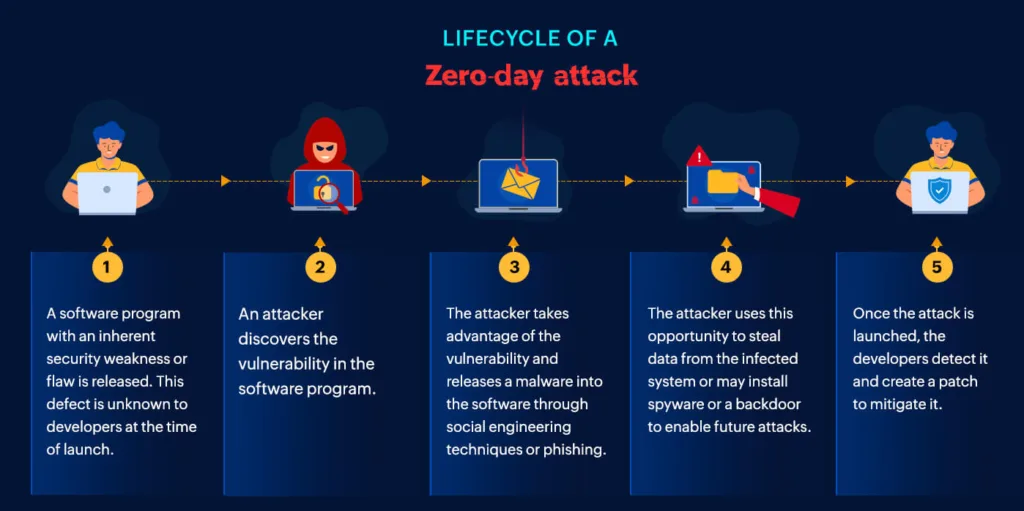
In this case, the zero-day vulnerability was reportedly being actively exploited in targeted attacks. This means some attackers were already using this flaw to compromise devices.
By releasing the March 2026 security patch, Google has now closed this security loophole.
Why This Update Is Important
Security updates may not always introduce visible changes, but they play a crucial role in protecting your device.
Here are some reasons why installing the latest update is important:
Protection Against Hackers
Cybercriminals constantly search for vulnerabilities to exploit. Security patches close these loopholes and reduce the chances of hacking attempts.
Data Protection
Smartphones store sensitive information such as:
- Banking apps
- Personal photos
- Emails
- Passwords
Keeping your device updated helps ensure that this data remains secure.
Improved System Stability
Security updates often include minor system improvements that enhance overall device performance and stability.
Protection From Malware
Malicious apps can sometimes exploit system vulnerabilities. Security updates reduce the risk of malware infections.
Also read : IDM vs FDM: Which is the Best Download Manager for PC in 2026?
Which Devices Will Receive the Update?
Google Pixel devices usually receive Android security updates first. After that, smartphone manufacturers roll out updates to their devices.
Devices likely to receive the update include:
Google Pixel Devices
- Pixel 8 series
- Pixel 7 series
- Pixel 6 series
Samsung Devices
- Galaxy S series
- Galaxy Z Fold and Flip series
- Galaxy A series (selected models)
Other Brands
Manufacturers like Xiaomi, OnePlus, Oppo, Vivo, and Realme will also release updates for supported devices.
However, the exact rollout schedule depends on each manufacturer.
How to Check for the Update
If you want to check whether the latest security update is available for your device, follow these steps:
- Open Settings on your smartphone
- Scroll down and tap Security & Privacy or Software Update
- Tap Check for Updates
- If the update is available, tap Download and Install
Make sure your phone has enough battery and a stable internet connection before installing the update.
Tips Before Installing the Update
Before updating your device, it is a good idea to take a few precautions.
Backup Your Data
Although updates usually install without issues, creating a backup ensures your important data remains safe.
Charge Your Phone
Make sure your battery is at least 50% charged to prevent interruptions during installation.
Use Wi-Fi
Security updates can be large in size, so downloading them over Wi-Fi is recommended.
Also read : iPhone App Crashes? Why It Happens and How to Stop It
What Happens If You Ignore Security Updates?
Some users delay installing updates because they believe updates may slow down their devices. However, ignoring security updates can put your phone at risk.
Possible risks include:
- Increased vulnerability to cyber attacks
- Exposure to spyware and malware
- Data theft
- Unauthorized access to accounts
Keeping your device updated is one of the simplest ways to protect your digital privacy.
Final Thoughts
The Android March 2026 Security Update is one of the most important patches released recently. With 129 vulnerabilities fixed, including a dangerous zero-day exploit, installing this update should be a priority for Android users.
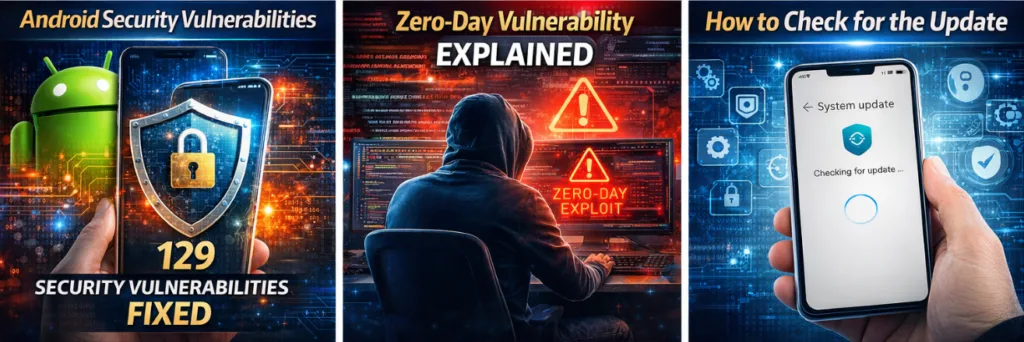
Even though security updates may not add new features, they play a critical role in keeping smartphones safe from cyber threats. Regularly updating your device ensures better security, improved performance, and protection for your personal data.
If your phone has not received the update yet, keep checking your system updates regularly, as manufacturers roll out updates in phases.