
A Windows computer becomes truly powerful when it is equipped with the right software tools. While Microsoft Windows already includes several built-in utilities, many third-party applications can dramatically improve productivity, performance, creativity, and system security.
The good news is that many of the best Windows tools are completely free to download and use. From media players and screen recorders to productivity apps and security tools, these programs can help you get the most out of your PC without spending any money.
In this guide, we’ll explore 15 of the best free Windows software you should install in 2026. These tools are trusted by millions of users and provide powerful features for everyday computing tasks.
Best Free Windows Software:
1. VLC Media Player – Powerful Free Media Player

VLC Media Player is one of the most reliable and versatile media players available for Windows. Developed by the VideoLAN project, VLC is an open-source application that supports nearly every audio and video format without requiring additional codecs.
Unlike many media players, VLC is lightweight, fast, and completely free from advertisements or tracking software. It can handle everything from standard video files to high-definition movies, DVDs, and even network streams.
VLC is widely used by millions of people worldwide because it works smoothly even on older computers and supports a wide range of customization options.
Key Features:
- Supports almost all video and audio formats
- Plays DVDs, CDs, and streaming media
- No ads or spyware
- Advanced playback controls
- Subtitle synchronization
Uses:
- Watching movies and videos
- Playing music files
- Streaming online media
- Viewing high-resolution content
🔽 Download VLC Media Player for Windows
2. 7-Zip – Free File Compression Tool
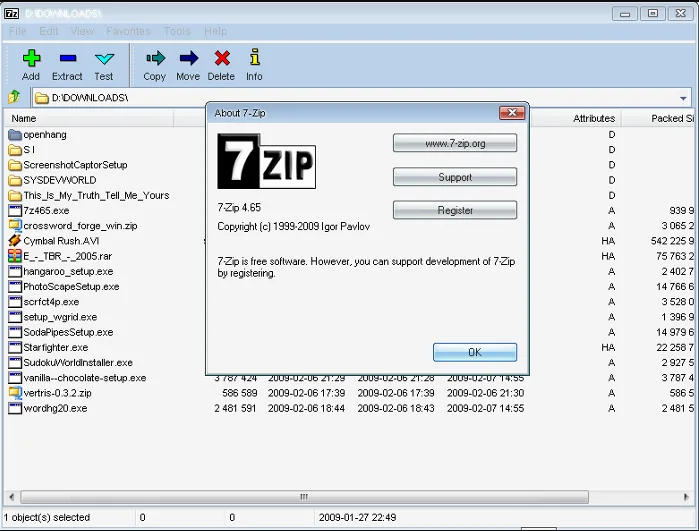
7-Zip is one of the best free file compression tools for Windows. It allows users to compress large files into smaller archive formats, making them easier to store or share.
This software is known for its extremely high compression ratio, especially when using its native 7z format. It also supports many other archive formats including ZIP, RAR, TAR, and ISO.
7-Zip integrates directly with Windows File Explorer, making it easy to compress or extract files with just a few clicks.
Key Features:
- High compression ratio
- Supports multiple archive formats
- Strong AES-256 encryption
- Lightweight and fast
Uses:
- Compressing large files
- Extracting archive files
- Securing files with passwords
- Organizing backups
🔽 Download 7-Zip File Compression Tool
3. Google Chrome – Fast & Secure Web Browser
Google Chrome is currently one of the most widely used web browsers in the world. Known for its speed, simplicity, and powerful features, Chrome provides a smooth browsing experience across different devices.
The browser includes built-in security protections, automatic updates, and a massive library of extensions that can enhance functionality.
Chrome also allows users to sync bookmarks, passwords, browsing history, and settings across multiple devices using a Google account.
Key Features:
- Fast browsing engine
- Thousands of browser extensions
- Built-in security protection
- Sync across devices
Uses:
- Web browsing
- Online work and research
- Accessing cloud services
- Installing productivity extensions
🔽 Download Google Chrome Browser
4. Mozilla Firefox – Privacy Focused Web Browser
Mozilla Firefox is a powerful open-source web browser known for its strong privacy protections and flexible customization options.
Unlike some browsers that collect user data, Firefox focuses heavily on protecting user privacy. It includes built-in tracking protection, enhanced security settings, and many customization tools.
Firefox is also highly optimized for performance and supports a wide variety of extensions and themes.
Key Features:
- Strong privacy protection
- Open-source platform
- Customizable interface
- Fast performance
Uses:
- Secure internet browsing
- Protecting personal data online
- Customizing browsing experience
- Accessing modern web apps
🔽 Download Mozilla Firefox Browser
Also read :
Windows 12: Expected Release Date, Features, and System Requirements
Photoshop vs Canva: Which One is Best for Designers in 2026?
5. Notion – All-in-One Productivity Workspace
Notion is a modern productivity platform that combines note-taking, project management, databases, and collaboration tools in one application.
It allows users to organize tasks, create documentation, track projects, and collaborate with teams in a flexible workspace.
Notion has become extremely popular among students, freelancers, entrepreneurs, and businesses because of its clean design and powerful features.
Key Features:
- Notes and document creation
- Task and project management
- Team collaboration tools
- Custom databases
Uses:
- Managing personal tasks
- Organizing projects
- Creating knowledge bases
- Team collaboration
🔽 Download Notion Productivity App
6. OBS Studio – Free Screen Recording Software
OBS Studio is a free and professional-grade screen recording and live streaming software. It is best free windows software.
It is widely used by YouTubers, streamers, educators, and content creators because it provides advanced recording features and full control over video production.
OBS allows users to capture screens, webcams, and audio simultaneously, making it ideal for tutorials, gaming videos, and live broadcasts.
Key Features:
- High-quality screen recording
- Live streaming support
- Multiple scenes and sources
- Advanced audio controls
Uses:
- Recording tutorials
- Live streaming games
- Creating YouTube videos
- Online presentations
🔽 Download OBS Studio Screen Recorder
7. ShareX – Advanced Screenshot Tool
ShareX is an advanced screen capture tool that provides far more features than the default Windows screenshot tool.
It allows users to capture screenshots, record screen videos, create GIFs, and instantly upload files to various cloud services.
ShareX is especially popular among developers, bloggers, and technical writers who frequently capture screenshots for documentation.
Key Features:
- Advanced screenshot tools
- Screen recording and GIF creation
- Built-in image editing
- Automatic uploads
Uses:
- Taking screenshots
- Recording short tutorials
- Creating animated GIFs
- Sharing captured images online
🔽 Download ShareX Screenshot Tool
8. Audacity – Professional Audio Editing Tool
Audacity is a free and powerful audio editing software used by podcasters, musicians, and audio engineers. This is best free windows software.
The software allows users to record, edit, and enhance audio files with various filters and effects.
Despite being free, Audacity includes many advanced tools found in professional audio editing software.
Key Features:
- Multi-track audio editing
- Noise reduction tools
- Audio effects and filters
- Supports many audio formats
Uses:
- Editing podcasts
- Recording voiceovers
- Cleaning background noise
- Producing music
🔽 Download Audacity Audio Editor
9. GIMP – Free Photoshop Alternative
GIMP (GNU Image Manipulation Program) is one of the best free alternatives to Adobe Photoshop.
It offers powerful image editing features including layers, filters, brushes, and advanced photo manipulation tools.
Graphic designers and photographers often use GIMP to edit images, design graphics, and create digital artwork.
Key Features:
- Advanced photo editing tools
- Layer support
- Custom plugins
- Wide format compatibility
Uses:
- Editing photos
- Creating graphics
- Designing web images
- Digital illustration
10. LibreOffice – Free Office Productivity Suite
LibreOffice is a free office productivity suite that provides tools similar to Microsoft Word, Excel, and PowerPoint.
It includes applications for word processing, spreadsheets, presentations, and database management.
LibreOffice is widely used by students, professionals, and organizations that prefer open-source software.
Key Features:
- Word processing tools
- Spreadsheet management
- Presentation creator
- Open-source platform
Uses:
- Writing documents
- Creating spreadsheets
- Preparing presentations
- Office productivity tasks
🔽 Download LibreOffice Office Suite
Also read:
Best Free AI Tools for Windows (2026) – Top AI Software You Must Try
IDM vs FDM: Which is the Best Download Manager for PC in 2026?
11. Malwarebytes – Powerful Anti-Malware Tool
Malwarebytes is a well-known cybersecurity tool designed to detect and remove malware, spyware, and ransomware. This is best free windows software.
It works alongside traditional antivirus programs to provide additional protection against modern threats.
Key Features:
- Malware detection
- Real-time protection
- Fast scanning engine
Uses:
- Protecting against malware
- Removing malicious programs
- Enhancing system security
🔽 Download Malwarebytes Security Tool
12. HandBrake – Free Video Converter

HandBrake is a free video conversion tool used to convert video files into different formats.
It is widely used by content creators and video editors who need to optimize videos for different devices and platforms.
Key Features:
- Convert videos to multiple formats
- High-quality compression
- Device optimization presets
Uses:
- Converting video formats
- Compressing large video files
- Preparing videos for mobile devices
🔽 Download HandBrake Video Converter
13. Everything – Lightning Fast File Search Tool
Everything is an extremely best free windows software. It is fast file search tool that helps users instantly find files on their computer.
Unlike Windows search, Everything indexes file names and displays results almost instantly.
Key Features:
- Instant file search
- Lightweight application
- Simple interface
Uses:
- Finding files quickly
- Managing large file collections
- Improving productivity
🔽 Download Everything File Search Tool
14. WinDirStat – Disk Space Analyzer
WinDirStat is a disk usage analysis tool that visually shows how storage space is being used.
The software displays files in colorful charts, making it easy to identify large files that are consuming disk space.
Key Features:
- Visual storage analysis
- File size identification
- Easy cleanup tools
Uses:
- Freeing up disk space
- Managing storage
- Identifying large files
🔽 Download WinDirStat Disk Analyzer
15. CCleaner – PC Cleaning & Optimization Tool
CCleaner is a popular system optimization tool that helps remove temporary files, browser cache, and unnecessary system data. This also best free windows software.
It helps keep your PC clean and running efficiently.
Key Features:
- Remove junk files
- Clean browser history
- Improve system performance
Uses:
- Cleaning temporary files
- Improving PC speed
- Maintaining system health
🔽 Download CCleaner PC Cleaner
Conclusion
The right software can dramatically improve the functionality of your Windows computer. The tools listed above are among the best free Windows software available in 2026, offering powerful capabilities for productivity, creativity, system optimization, and security.
By installing these applications, you can enhance your PC experience and make everyday tasks easier and more efficient.
Best Free Windows Software FAQs
Is free software safe to install on Windows?
Yes, most free software is safe if downloaded from official websites. Trusted programs like Mozilla Firefox, Audacity, and GIMP are widely used and regularly updated to maintain security.
Which free software can improve PC performance?
Tools such as CCleaner, WinDirStat, and Everything can help optimize your system by cleaning unnecessary files, analyzing disk usage, and quickly finding files on your computer.
What is the best free office software for Windows?
One of the best free office suites available is LibreOffice. It includes applications similar to Microsoft Word, Excel, and PowerPoint, making it a powerful free alternative for creating documents, spreadsheets, and presentations.
Which free software is best for screen recording on Windows?
OBS Studio is one of the best free screen recording tools available for Windows. It allows users to record their screen, stream live content, and create professional-quality video recordings.
What is the best free image editing software for Windows?
GIMP is one of the most powerful free image editing tools. It provides advanced photo editing features similar to premium software like Photoshop.
Do these free Windows software work on Windows 11?
Yes, most of the software listed in this guide works perfectly on Windows 10 and Windows 11, as they are regularly updated to support the latest Windows versions.
Why should you install useful software on Windows?
Installing useful software can help improve productivity, system performance, security, and entertainment. Tools like media players, productivity apps, and system utilities make everyday computer tasks much easier.