
Scientific Toolworks Understand for macOS is a powerful static code analysis and software comprehension tool designed to help developers, engineers, and software teams better understand, analyze, and maintain complex source code. It is widely used by professional developers, researchers, and organizations that work with large or legacy codebases written in multiple programming languages.
Unlike traditional code editors or IDEs, Understand focuses on deep code insight. It helps users explore dependencies, analyze code quality, visualize relationships between files, functions, and classes, and identify potential issues before they become serious problems. With its advanced parsing engine, Understand can process millions of lines of code efficiently, making it an essential tool for large-scale software projects.
On macOS, Scientific Toolworks Understand delivers a stable, fast, and intuitive interface optimized for Apple’s ecosystem. Whether you are a software architect, quality assurance engineer, security analyst, or student learning complex programming concepts, Understand provides the clarity and structure needed to work confidently with large codebases.
Key Features of Scientific Toolworks Understand for macOS
1. Advanced Code Analysis Engine
Understand analyzes source code at a deep semantic level instead of relying only on text parsing. It recognizes functions, classes, variables, dependencies, and relationships across multiple files and languages.
2. Multi-Language Support
The tool supports a wide range of programming languages, including:
- C, C++
- Java
- Python
- C#
- JavaScript
- Ada
- Fortran
- VHDL
- PHP
This makes it ideal for mixed-language projects and legacy system maintenance.
3. Interactive Code Browsing
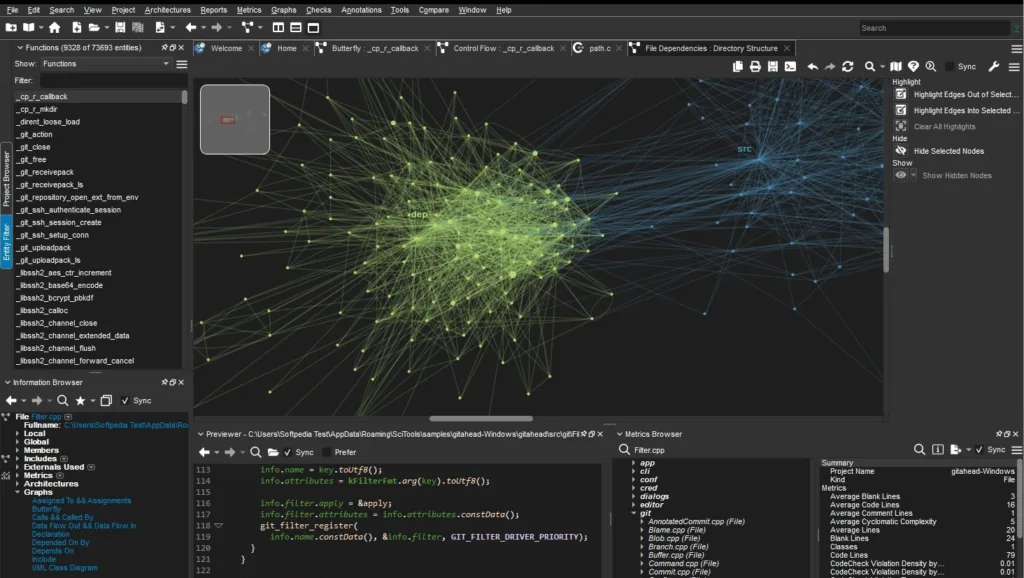
Users can easily navigate through functions, classes, and modules using a powerful code browser. Clicking on any symbol instantly reveals where it is defined, used, or referenced across the entire project.
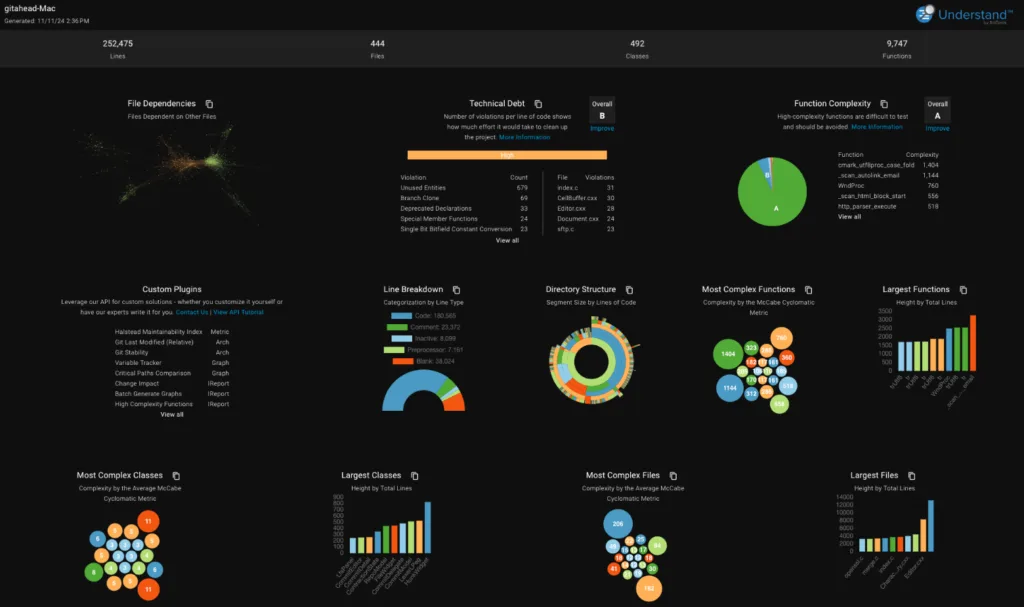
4. Dependency Graphs & Visualizations
Understand automatically generates visual diagrams that show:
- Call graphs
- Inheritance trees
- File dependencies
- Control flow paths
These visual representations help developers quickly grasp complex architectures.
5. Metrics and Code Quality Analysis
The software provides detailed metrics such as:
- Cyclomatic complexity
- Lines of code (LOC)
- Maintainability index
- Code duplication
- Comment density
These metrics help teams improve code quality, maintainability, and performance.
6. Powerful Search & Query System
Understand includes an advanced query engine that allows users to search code using logical expressions. This helps locate unused variables, dead code, or risky dependencies within seconds.
7. Version Control Integration
It integrates seamlessly with popular version control systems such as Git, SVN, and Perforce, allowing developers to analyze changes across different versions of a project.
8. Scriptable Automation
With built-in scripting support (Python, Perl, and others), users can automate repetitive analysis tasks, generate custom reports, and integrate Understand into CI/CD pipelines.
9. Customizable Reports
The tool allows exporting reports in multiple formats including HTML, CSV, and XML. These reports are ideal for documentation, audits, and team reviews.
10. Cross-Platform Compatibility
Although optimized for macOS, Understand works consistently across Windows and Linux, making it suitable for cross-platform development teams.
Also read:
Wondershare PDFelement Pro 12.1.2 (OCR) Free Download
Technical Details
Below are the technical highlights of Scientific Toolworks Understand for macOS:
- Software Type: Static Code Analysis Tool
- Developer: Scientific Toolworks, Inc.
- Platform: macOS
- Architecture: 64-bit
- Supported Languages: C, C++, Java, Python, Ada, Fortran, JavaScript, C#, PHP, and more
- Database Engine: Proprietary high-performance code database
- Analysis Type: Static analysis (no runtime execution required)
- Output Formats: HTML, XML, CSV, text-based reports
- Integration: Git, SVN, CI/CD tools
- User Interface: GUI + command-line interface
System Requirements
To ensure smooth performance, your system should meet the following minimum and recommended requirements:
Minimum Requirements
- Operating System: macOS 10.13 or later
- Processor: Intel or Apple Silicon (M1/M2 supported)
- RAM: 4 GB
- Storage: 1 GB free disk space
- Display: 1280×800 resolution
Recommended Requirements
- Operating System: Latest macOS version
- Processor: Apple Silicon or Intel i5/i7
- RAM: 8 GB or more
- Storage: SSD with 2 GB+ free space
- Display: Full HD or higher resolution
Uses of Scientific Toolworks Understand
1. Code Comprehension
Developers use Understand to quickly understand unfamiliar or legacy codebases, reducing onboarding time and improving productivity.
2. Software Maintenance
The tool helps identify redundant, unused, or risky code sections, making maintenance easier and safer.
3. Quality Assurance
QA teams rely on its metrics and reports to detect code smells, complexity issues, and potential bugs before deployment.
4. Security Auditing
Understand helps detect insecure coding patterns and dependency risks, contributing to stronger application security.
5. Academic & Research Use
Students and researchers use it to study software architecture, analyze algorithms, and understand large academic codebases.
6. Project Documentation
Automatically generated documentation and diagrams help teams maintain up-to-date technical records.
Frequently Asked Questions (FAQs)
Q1. Can Understand handle large projects?
Yes, it is specifically designed to analyze large-scale and enterprise-level projects with millions of lines of code.
Q2. Does it support Apple Silicon Macs?
Yes, the latest versions are fully compatible with Apple Silicon (M1, M2, and newer chips).
Q3. Is programming knowledge required to use Understand?
Basic programming knowledge is recommended, but the visual tools make it easy for beginners to understand code structures.
Q4. Can I export analysis reports?
Yes, you can export detailed reports in multiple formats such as HTML, CSV, and XML.
Conclusion
Scientific Toolworks Understand for macOS is a powerful and reliable solution for anyone who works with complex codebases. Its advanced analysis capabilities, intuitive interface, and wide language support make it one of the best tools for understanding, maintaining, and improving software quality. Whether you are a professional developer, software architect, or student, Understand helps transform complex code into clear, manageable insights.
If you are looking for a professional-grade code analysis tool that improves productivity, reduces risk, and enhances software quality, Scientific Toolworks Understand for macOS is a smart and dependable choice.